From Prompt to Animation: The Best AI Image to Video Generator Free Tools in 2026
 Picrevamp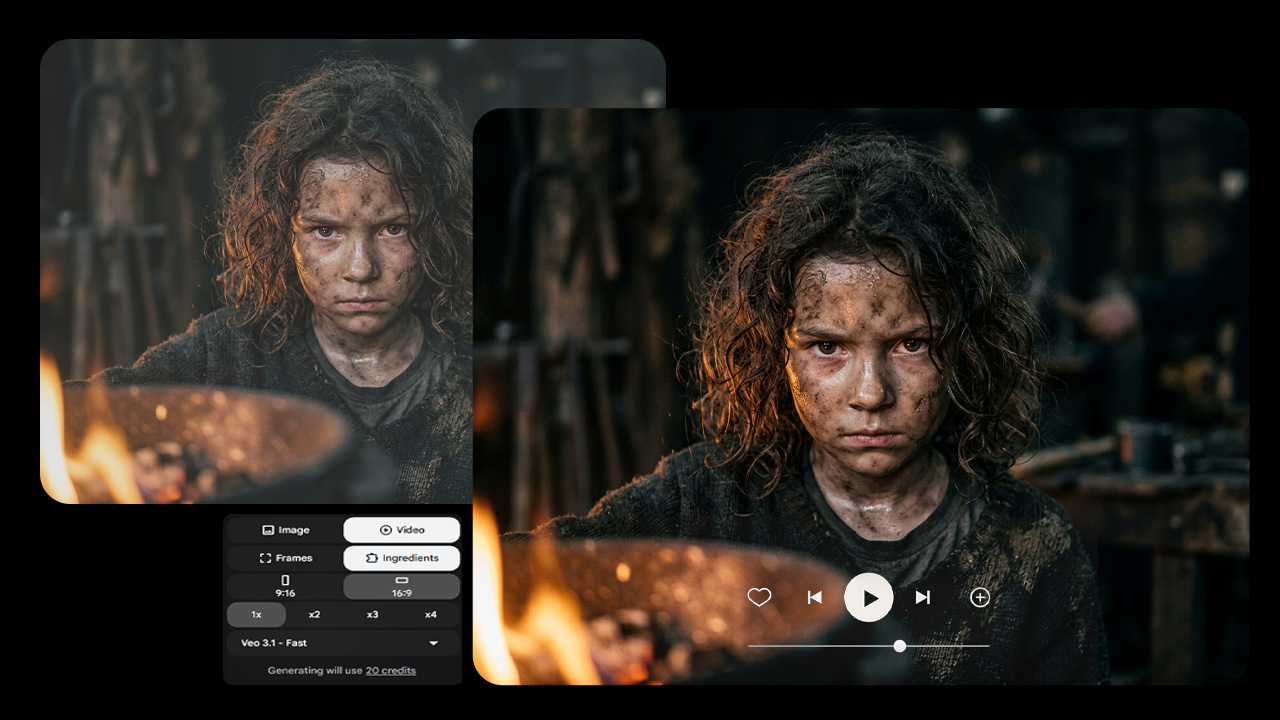
A massive paradigm shift took place within the realm of digital content creation in 2026. As it used to be the case that high-quality static visuals were all it took to grab viewers' attention, the algorithms used by platforms such as TikTok, YouTube Shorts, and Instagram Reels have increasingly begun valuing dynamic and motion-driven content. In today's day and age, adding motion to a static image is not an optional skill anymore but rather a necessary one.
The problem was always with the high barrier of entry. The early animation applications came loaded with issues like very expensive subscription fees, restrictive daily use and extremely huge watermarks that would spoil the professional aspect of the end product. Thankfully, things have changed for the better and now you can easily find a high-quality ai image to video generator free
Why Static to Motion Is Becoming So Popular in 2026
First, let us talk about the reasoning behind why there has been such high demand for an ai image to video generator free.
A couple of years ago, the main problem with AI-generated videos was that faces melted, warped backgrounds were created, and the physics of the situation was completely unrealistic. However, now the very core of this technology has changed, and nowadays the AI can create a proper 3D environment with the correct lighting.
As a result of this evolution, there is an unbelievably popular "faceless channel" phenomenon. Creators have started creating incredibly realistic digital avatars through ai image generation software and animating them using video models, which will perfectly sync the lips, provide authentic audio, and micro expressions. For businesses, this means creating a 15-second commercial out of a regular product photograph, along with panning and proper lighting—completely for free.
Top AI Image to Video Generators Free Platforms
In case you wish to design impressive motion graphics without having to spend any money on it, here are some of the best platforms doing the job in 2026.
1. Kling AI (Version 3.0): The Cinematic Storyteller
Kling AI has become incredibly popular in recent times and has become a go-to option for content creators looking for longer video durations and hyper-realistic human animations.
How it Works and Features:
With the help of Kling AI 3.0, users can upload a single image and create multi-shot videos of up to 15 seconds long. What makes it unique is its "All-in-One Reference." It means that you can upload an image created using AI and write down some dialogues or upload a voiceover and Kling AI will make your image talk using perfectly synced lips.
What's impressive is that even the free plan offered by them lets you export videos in 1080p HD format without the obnoxious watermarks.
2. PromeAI: The Spatial Design Specialist
Whereas other programs like Kling work in the realms of character animation and cinematic storytelling, PromeAI has been able to carve out a very lucrative and niche-oriented space: architecture, interior design, and product marketing.
Features and How It Works:
PromeAI has a more in-depth understanding of the physical structure of an image than nearly any other free software available. Two of its unique capabilities, namely TextureLock Rendering and Region Rendering, are truly groundbreaking in their nature. Let’s say you have created a great image of an empty contemporary living room. Using PromeAI, you can make the program put a sofa in this room, and then only create the 3D animated spin of the sofa. All of this is done while keeping the textures and lighting of the whole room intact.
3. Google Veo 3 & 3.1: The Physics and Realism Workhorse
The Google's DeepMind team is known for its revolutionary work in the field, which is best seen in the capabilities of their Veo models. With Veo 3.1 coming out as a response to high-end enterprise video generators, Google offers Hollywood-caliber physics to the consumer market.
Features:
One of Veo 3.1's strengths is its ability to render highly realistic physics which break other models. From a macro-level shot of water droplet splash, to a detailed campfire animation with proper smoke diffusion, to the complicated reflections of neon lights on wet streets – it does everything beautifully. Additionally, Veo 3.1 offers precise control over camera movements within the scene, allowing users to specifically prompt the software to create a "slow drone fly-over," a "fast crash zoom" or a "smooth Steadicam pan."
4. PicRevamp: One-stop Creative AI Platform for Creators
While the individual tools we have listed here are immensely useful in their own right, the biggest pain point for any creator in today’s world is switching from one app to another. Using one website for generating images, another for fixing their resolution, and another to create animations can be really frustrating.
This is precisely why PicRevamp comes in as the ultimate all-in-one solution for creators. It has been designed to bring all the most powerful generative tools and post-editing tools to your fingertips on a single platform.
Rather than juggling various subscription services, PicRevamp provides you with easy access to one of the best sets of Image Models out there, featuring the much-demanded Nano Banana Pro, the versatile Nano Banana 2, the regular Nano Banana, and the ultra-fast Flux Schnell. Thus, you can produce any type of image, ranging from hyper-realistic photography to vector art in no time at all.
PicRevamp is more than just an ai image generator; PicRevamp is a whole movie studio. The platform features Veo 3.1 video model built right in, so you can easily turn your just-produced image with Nano Banana Pro into a physics-accurate video without even leaving the website.
Apart from ensuring that you generate quality images, PicRevamp has provided essential editing tools for you to make sure that your image is perfect before starting the process of animating. You can upscale your basic image to 4k through Image Upscaler, remove background perfectly with the AI Remove Background feature, and expand your canvas for various social media formats such as 9:16 for Tiktok and 16:9 for YouTube through AI Image Expander. In essence, PicRevamp makes the process of digital content creation frictionless.
Zero Cost Workflow for Creators: From the Prompt to the Motion
As a startup or a faceless channel, it is important that you optimize yourself in terms of cost. One way to do that is to learn the skill of credit stacking.
This masterclass will teach you how to create a fully optimized, zero cost workflow by utilizing an ai image generator free credits daily and an ai image to video generator free.
Step 1: Ideas and Base Generation
Your video is only as good as your base image. Avoid wasting valuable video generation credits on an unsuitable image.
First, use a website that works as ai image generator free credits daily (e.g. Leonardo.Ai or using daily quotas of powerful sites such as PicRevamp). Use your daily credits to quickly test your ideas. Generate 10 to 15 iterations of your idea using a quick model such as Flux Schnell.
Step 2: Enhance, Extend and Scale
After finding that perfect base image, you'll have to prepare it for video AI generation. High-quality images with lots of data to draw upon are what video AI requires.
Upload your selected image into the Image Upscaler to increase clarity and get rid of any minor blur. In case your image is square but your goal is to make a YouTube Short, pass your image through AI Image Expander to create a seamless vertical environment on the top and bottom.
Step 3: Animate with Purpose
After uploading your high-resolution and perfectly cropped picture, proceed to load it into your selected ai image to video generator free application (such as Kling 3.0 or the Veo 3.1 version of PicRevamp).
Avoid just pressing the animate button. Instead, use targeted animation instructions for the AI. For instance:
Rather than: "Animate the driving car."
Instruction: "Low-angle tracking shot of a sports car accelerating ahead with wheels throwing up realistic smoke behind them and background blurring from movement."
Step 4: Exporting and Publishing
The model will now analyze your prompt. Since your images have been formatted properly, and you are using an advanced 2026 platform, the end result should be a clean video that is 1080p and free from any distortions or watermarks.
The "Weird AI Look": Tips for Trouble Shooting
Though all the best software available in 2026 helps in avoiding any problem, sometimes you may get odd results with the wrong guidance. Here is what you can do to troubleshoot and perfect your process.
1. The Problem: Morphed Faces and Limbs
The Solution: It mostly happens because you have asked the AI to make the subject do a large physical move ("man does a backflip"), but the subject was standing absolutely still in the image. AI video generators are more effective with subtle continuation. Ask for environment changes or camera changes, such as: "subtle wind blowing through hair, gentle camera pan to the right, subtle lighting changes."
2. The Problem: The Background is Warping
The Solution: If the background is warping as the subject moves around, you will need to use a platform that allows region rendering or "motion brushes." You need to mask out the background, and tell the AI to keep that region at a motion value of "0" while applying motion only to the subject.
3. The Problem: Awkward Lip-syncing
The Solution: While working with dialogue tools (such as Kling 3.0), you should ensure that the base image is the one with the person looking at the camera with a closed relaxed mouth. If the base image is with an opened mouth and/or teeth visible, then the AI will have difficulties calculating the starting position of the phonemes.
Conclusion
The age of boring, stagnant images is quickly coming to an end. The breakthroughs achieved in 2026 mean that capitalizing on the capabilities of an ai image to video generator free is the only method to step up your game and stay relevant.
The key to victory is in your workflow. By employing the maximum limits of ai image generator free credits daily to generate the ideal base image, by upscaling and expanding your image using powerful tools, and by animating it through specific cinematic prompts, you will be able to compete with studio animations, but completely for free!
Whether you are working with specialized separate services or with the comprehensive solution provided by PicRevamp, the tools needed for stunning animations are already at your disposal. Don't settle for ordinary images – animate your imagination!